
• Steam recently changed the default privacy settings for all users. This may impact tracking. Ensure your profile has the correct settings by following the guide on our forums.

FSHOSTGUI v1.0

Nefarious

Celestial Troupe
[Release] FSHOSTGUI 1.0 Revision 2 Updated (8/2/2008)

FSHOSTGUI is a Microsoft Windows application serves as a front-end for USBHostFS by TyRaNiD.
design in a simplified GUI & system tray integration. This application also facilitates the
execution of RemoteJoySDL, also by TyRaNiD, which can be used to output PSP's screen display
and control via PC. As far as i've tested, You can use Poisonhzkj's HostCore with this.


PC Run-time Requirements:
- Microsoft.Net Framework 2.0 (can be downloaded at: http://www.microsoft.com/downloads/...cb-4362-4b0d-8edd-aab15c5e04f5&displaylang=en)
- libUSB driver (included in the package)
- USBHostFS for PC (included in the package)


PSP apps (Optional)
- HostCore (can be downloaded at: http://www.2alien.info/)


About this update:
- Replaced usbhostfs.prx & remotejoy.prx with new binaries. Eliminating hangs upon game exit.
- Removed the use of PSPLink & shell interface. to simplify the use, as they will not be needed anymore as pre-requisites.
- Updated the front-end.

- Fixed config reading which produces an error "Root directory is invalid.".

Note: Keep in mind that Remotejoy is not that stable for some games. Noticeably will hang on some games with savegame auto-load features and sometimes during save. So use this with your own risk.


Credits:

TyRaNiD & Co. for providing us USBHostFS and RemoteJoy SDL.
Weltall for RemoteJoySDL & USBHostFS binaries.
Poisonhzkj for HostCore (a very good plugin which utilize the use of USBHostFS).
PS2Dev, eXophase & QJ.NET as a channel of PSP development.

Note: If someone i've forgot to include in the credits section kindly notify me, I'll appreciate it :)
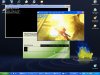
 

Attachments

  • Preview.jpg
    Preview.jpg
    207.2 KB · Views: 219
Hi Nefarious,

I put up the prxs and enabled them, setup the PC, and got it working. I encountered 2 problems, however, :

1. the sounds still reside in the psp, not in the pc.

2. when i closed the fshostgui in the pc, and exit the game in the psp, my psp went into a black screen with "please wait", hanging. I can't off or reset the psp by using the power/hold. I could only un-hang the psp by taking out the battery and putting it back to reboot normally.

You have any advice to overcome the abv ?

Thk u very much !
 
FSHOSTGUI v1.0 revision 2

Hi Nefarious,

I put up the prxs and enabled them, setup the PC, and got it working. I encountered 2 problems, however, :

1. the sounds still reside in the psp, not in the pc.

2. when i closed the fshostgui in the pc, and exit the game in the psp, my psp went into a black screen with "please wait", hanging. I can't off or reset the psp by using the power/hold. I could only un-hang the psp by taking out the battery and putting it back to reboot normally.

You have any advice to overcome the abv ?

Thk u very much !

Hi aero125, I've just updated the files as FSHOSTGUI v1.0 revision 2 so you can download the latest update.

About your questions

#1, RemoteJoy doesn't support audio stream output from the beginning. But if you still want to, you might want to connect your PSP to your PC's audio line-in.

#2, That problem has been already resolved in this update (v1.0 r2), thanks to Weltall.
 
Hi Nefarious,

Rev 2 doesn't seem to work in my psp (390M33-3).

I did exactly what is told in the readme, and when i activated fshostgui, the console screen returns a "Root Directory is invalid". Both remotejoy and usbhostfs prx are enabled at recovery.

When I deleted the 3 files (in the rev2) and replaced back the 5 files (in rev1) in the seplugins folder, activated them at recovery and run fshostgui again, it worked. The PC detected my PSP.

Eh ..... what's went wrong ??

By the way, you mentioned connecting the psp to line-in to get the sound in PC, do you mean connecting the headphone outlet in the psp to the line-in inlet of the PC ?

Thk u very much.
 
Rev 2 doesn't seem to work in my psp (390M33-3).

I did exactly what is told in the readme, and when i activated fshostgui, the console screen returns a "Root Directory is invalid". Both remotejoy and usbhostfs prx are enabled at recovery.

It seems your root/host directory indicated in FSHOSTGUI panel does not exist. Set that properly (e.g. "C:\PSP") or USBHOSTFS will not launch. And also, remotejoy.prx and usbhostfs.prx are the only prx's i've included in the package. remove the old ones for only these two are needed.

To avoid confusions, just delete all the old prx's.. you may skip .Net Framework & libUSB driver setup since you have installed it earlier otherwise you can re-install them.

By the way, you mentioned connecting the psp to line-in to get the sound in PC, do you mean connecting the headphone outlet in the psp to the line-in inlet of the PC ?

Yes, thats what I mean. since RemotejoySDL wasn't originally programmed to display with sound.
 
Hi Nefarious,

I have just tried again, earlier on 390m33-3, now on 401m33-2. Rev 2 cannot detect my psp, returning " a root directory is invalid".

Rev1 worked in both 390 and 401, auto detected my psp when fshostgui was run, and output the display on the pc, except of course with the 2 problems that I highlighted earlier.

I have ensure all the correct files (2 in rev2) were replaced, the old Rev1 ones deleted, and updated the game.txt. Both prxs were also enabled in recovery.

I have also re-downloaded the rar and extracted them again.

The procedure were correct, but rev2 just failed to detect my psp ???
 
Thanks for the advice and yes, i've checked it out and got messed up the config.
fixed and updated the attached file :)
 
Quite busy to forgot something like that, unforgivable:sad:

The new project i'm working on is all about IDStorage keys stuff and a couple of
important diagnostic functions from PSPSDK. I've been planning to do this a month
ago but just got started this week since i don't have much of my time and resource.
Fortunately, LAN.st and PS2Dev have provided me enough info on how to deal with
it.:smile:
 
Hey, Thks, it's working now !


Thanks for the advice and yes, i've checked it out and got messed up the config.
fixed and updated the attached file :)
 
COOL
 
Works on 4.01M33-2 and Vista

Hi Nefarious,

I got this working on my Slim running CFW 4.01M33-2 connected to Vista desktop.
I get both the XMB and Games on the desktop window and it even worked in fullscreen mode.

I think this could be a wonderful way for creating video demos of the PSP screen.

What are the files in Tools folder (of your download) for?
 
Problem with USB Connection

Hi Nefarious,

I got this working on my Slim running CFW 4.01M33-2 connected to Vista desktop.
I get both the XMB and Games on the desktop window and it even worked in fullscreen mode.

I think this could be a wonderful way for creating video demos of the PSP screen.

What are the files in Tools folder (of your download) for?

But this seems to have created a problem with connecting the PSP in normal USB mode.

Now everytime I click on USB connection in XMB, PSP hangs with a "Please wait.." message..
Second time i try USB connection; PSP throws 80243101 internal error. But shows up on my PC as connected.
If i click Back on PSP, I can use XMB as normal but PSP stays connected to PC. I have to pop it out using windows remove usb device option.
 
Ya, Nefarious, I got the same problem as neo_in.

The problem started after exiting from remotejoy and fshostgui.

I tried rebooting the psp, the usb connection still showed error even though the psp folders can be seen in the pc. The psp cannot control the in/out of the usb connection. The psp-pc connection can only be disabled by clicking the remove hardware from the pc. Thereafter when I tried to reconnect again, the psp lost control.

I rebooted the pc, the usb connection still show error. Same behaviour as abv.

The psp got back to normal only after I disabled the plugins at recovery.

By the way, it seems that older games will hang at beginning, such as Dungeon&DragonTactics, DungeonSiege. LOH3 and ProCyclying2008 OK.


But this seems to have created a problem with connecting the PSP in normal USB mode.

Now everytime I click on USB connection in XMB, PSP hangs with a "Please wait.." message..
Second time i try USB connection; PSP throws 80243101 internal error. But shows up on my PC as connected.
If i click Back on PSP, I can use XMB as normal but PSP stays connected to PC. I have to pop it out using windows remove usb device option.
 
But this seems to have created a problem with connecting the PSP in normal USB mode.

Now everytime I click on USB connection in XMB, PSP hangs with a "Please wait.." message..
Second time i try USB connection; PSP throws 80243101 internal error. But shows up on my PC as connected.
If i click Back on PSP, I can use XMB as normal but PSP stays connected to PC. I have to pop it out using windows remove usb device option.


Yes, since PSP's USB is being used by USBHostFS. it will require you to turn it off from recovery
menu. If you're asking me to adjust USBHostfs which is Tyranid's, It is impossible.

FSHOSTGUI is only a mere Front-end for USBHostFS.
 
Back
Top