
• Steam recently changed the default privacy settings for all users. This may impact tracking. Ensure your profile has the correct settings by following the guide on our forums.

Normal Boot Loader For Pandora's Battery Released

x3sphere

Administrator
Staff member
Enforcer Team
Game Info Editor
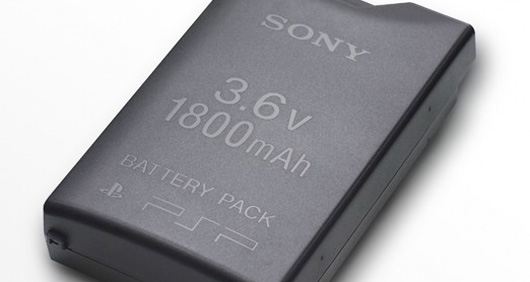
batterypsp.jpg


BOOSTER of DevHook fame has released a normal boot loader utility for anyone who has converted a PSP battery to Pandora.

Essentially, what this tool can do, is write a special IPL to any Memory Stick PRO DUO (no, 32MB sticks won't work) so that when inserted in conjunction with a Pandora's Battery, the PSP will boot to the XMB as normal. Quite useful if you have any spare memory sticks laying around.

[blockquote2]How to install

1.Double click "install.cmd" in Windows XP/2K(Administrator).
2.Connect MsProDuo to PC via USB.
It is possible to use PSP USB Connection,or any USB MsProDuo Reader.
3.press 'Y' key to "Are You Sure ?[Y]" message.
4.Disconnect MsProDuo after few seconds.

Or,
Write the ipl_ms.bin to absolute sectors 0x10-0x17 of MsProDuo.[/blockquote2]

Download Normal Boot Loader For Pandora's Battery
 
i can't seem to get it done. currently using ms card reader and ms, showing it is on my "I" drive.

1)i go to start>run>"cmd"
2)typed in "cd .."
3)typed in "cd psp_normal_boot_loader"
4)typed in "msinst I ipl_ms.bin"

ERROR: Cannot Open I. why is this so?
 
i can't seem to get it done. currently using ms card reader and ms, showing it is on my "I" drive.

1)i go to start>run>"cmd"
2)typed in "cd .."
3)typed in "cd psp_normal_boot_loader"
4)typed in "msinst I ipl_ms.bin"

ERROR: Cannot Open I. why is this so?

Strange... by any chance do you have a file open on the memory stick or is an explorer window open on it? If that's the case then the memory stick is technically "in-use" and the program can't write to it, so close out of any windows using the MS.
 
How to install

1.Double click "install.cmd" in Windows XP/2K(Administrator).
2.Connect MsProDuo to PC via USB.
It is possible to use PSP USB Connection,or any USB MsProDuo Reader.
3.press 'Y' key to "Are You Sure ?[Y]" message.
4.Disconnect MsProDuo after few seconds.

Or,
Write the ipl_ms.bin to absolute sectors 0x10-0x17 of MsProDuo.

With reference to the instructions in the first part, I do not get the press 'Y' key. the windows command prompt window only gets stuck at

"Connect target MsProDuo"
 
i perfer putting your MS into your PSP and connect it to your computer with USB.
don't connect before you start install.cmd!
it works perfectly,

the only problem is, after you boot it, and you just power button up to let the PSP go into standby mode, it closes completely. so if your using it to play a long game, don't close it, or else when you boot it back up again it starts all the way the from the logo screen.
 
I told him to try running mspformat on the stick, that might fix it. If not then BOOSTER's tool must be set up to read from USB only and it won't work on card readers.
 
Hey guys,

I'd just have a few questions.

1: Is the memory card useless for all other intents and purposes after this? Or can it be used to store games photos etc. just like before?

2: Can this modification be reversed (the memory card, not the battery)?

3: I've heard something like that you cannot recharge your battery anymore after it has been converted to a pandora's... is this true?
 
Back
Top