
How to install a secure* VNC server on your pc
for Newbiez
controll your pc with your psp wirelessly!
by XsavioR

1. Install Portable vnc on your PsP
a. Install (simply extract the exe to your OE psp drive letter)
b. Setup
1. Create a Static network connection
First we need to configure our PSP to work on our network. to do this we go to the Settings tab then all the way down to "Network Settings" From here select "Infrastructure Mode" then "-New Connection-" name it whatever you want to. On the next page you need to know your SSID, if your network is broadcasting your SSID you can just press the Scan button, here you will also need to input any encryptions your network may have, Assuming we have no encryption and our network is broadcasting our SSID (most factory defaults are set this way) we will select the Scan option and select our wireless network. On the next page titled "Address Settings" YOU MUST SELECT CUSTOM FOR THIS TO WORK WITH PVNC. In IP Address Settings select MANUAL you will be presented with a page that looks like this:

Your ipaddress should be something like 192.168.1.25
Subnetmask is as it appears above
In your router configuration page, find your routers ip (usually 192.168.1.1) This is your default router, and primary DNS
The easiest way to find this information is to get on a windows computer that is on the same wireless network, it can even be wired to the router, you can get this info in windows by going to the Start menu > Run > cmd, then type "ipconfig /all" you will be presented with information simular to this:
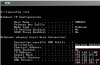
The information that is in the Red Square is what we are interested in, you can copy all the fields over directly except for the IP Address feild, this address needs to be Identical to your Default Gateway except for the last for digits, so if your Default Gateway is 192.168.1.1 you can use anything between 192.168.1.2 - 192.168.1.255 Note that most routers by factory default set there DHCP to start routering pc's on 192.168.1.100 so its a good Idea to use an address lower then that or significantly higher.
Here is what your psp should look like with all the correct information from the ipconfig:
Of course yours will be different....
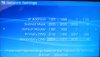
On the next page it will ask you about a Proxy Server, in most cases you won't need this so just select "Do Not Use" The following page just verifys your settings, just click next and press X to save. Now go over to your pc and install TightVNC, its pretty straight forward so we won't go over it in this tutorial.
Next go back to your PSP and go to the "Game" tab, scroll down to "Memory Stick" and click on it. You should see a program called "Portable VNC Viewer" Click on it. If all goes well you will be presented with a screen that looks like this:

Click on the connection you just made. Click on Add a new Host:
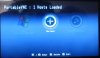
Add your Host (pc running TightVNC) IP to your psp's database, you can obtain the ip of your host using the ipconfig command that I told you about earlyer.

Name your connection, Any name will do. Then select option Enter to continue
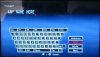
Select an appropriate icon and hit x.
Portablevnc is now installed. But will error out still, dont worry , well come back.
2.Install Tightvnc on your Pc
a. Install (this is pretty simple, click ok a bunch)
b. Setup
Right click the Tightvnc icon in your taskbar. Goto properties, click. advanced , uncheck enable builtin http daemon.
Its all set next step
3. Configure your router for "Port Fowarding"
Open your routers configuration page and find the option for port fowarding and put in these ports, with the ipadress of the pc running Tightvnc. It should look something like this:

4. Optional: Install ZoneAlarm (gets you past the -1/116 error)
a. Install (follow the instaler instructions)
b. Reboot pc (random things will ask for permission to access the internet.. allow them this is just setup)
c. Setup
Click on the Z icon in your taskbar. Click on the Alerts and Logs Tab on the left , and click on the Log viewer Icon in the uper right.
Now goto the psp and try again to connect to the server... An error will pop up on Zonealarm... Click on it , and click add zone on the lower right. CLick on Trusted and name it vnc. Now when Pvnc errors on the psp, try to connect again
Jualla VNC on your pc.
Download the pdf for pictures Borrowed from the ihack tutorial.
for Newbiez
controll your pc with your psp wirelessly!
by XsavioR
1. Install Portable vnc on your PsP
a. Install (simply extract the exe to your OE psp drive letter)
b. Setup
1. Create a Static network connection
First we need to configure our PSP to work on our network. to do this we go to the Settings tab then all the way down to "Network Settings" From here select "Infrastructure Mode" then "-New Connection-" name it whatever you want to. On the next page you need to know your SSID, if your network is broadcasting your SSID you can just press the Scan button, here you will also need to input any encryptions your network may have, Assuming we have no encryption and our network is broadcasting our SSID (most factory defaults are set this way) we will select the Scan option and select our wireless network. On the next page titled "Address Settings" YOU MUST SELECT CUSTOM FOR THIS TO WORK WITH PVNC. In IP Address Settings select MANUAL you will be presented with a page that looks like this:
Your ipaddress should be something like 192.168.1.25
Subnetmask is as it appears above
In your router configuration page, find your routers ip (usually 192.168.1.1) This is your default router, and primary DNS
The easiest way to find this information is to get on a windows computer that is on the same wireless network, it can even be wired to the router, you can get this info in windows by going to the Start menu > Run > cmd, then type "ipconfig /all" you will be presented with information simular to this:
The information that is in the Red Square is what we are interested in, you can copy all the fields over directly except for the IP Address feild, this address needs to be Identical to your Default Gateway except for the last for digits, so if your Default Gateway is 192.168.1.1 you can use anything between 192.168.1.2 - 192.168.1.255 Note that most routers by factory default set there DHCP to start routering pc's on 192.168.1.100 so its a good Idea to use an address lower then that or significantly higher.
Here is what your psp should look like with all the correct information from the ipconfig:
Of course yours will be different....
On the next page it will ask you about a Proxy Server, in most cases you won't need this so just select "Do Not Use" The following page just verifys your settings, just click next and press X to save. Now go over to your pc and install TightVNC, its pretty straight forward so we won't go over it in this tutorial.
Next go back to your PSP and go to the "Game" tab, scroll down to "Memory Stick" and click on it. You should see a program called "Portable VNC Viewer" Click on it. If all goes well you will be presented with a screen that looks like this:
Click on the connection you just made. Click on Add a new Host:
Add your Host (pc running TightVNC) IP to your psp's database, you can obtain the ip of your host using the ipconfig command that I told you about earlyer.
Name your connection, Any name will do. Then select option Enter to continue
Select an appropriate icon and hit x.
Portablevnc is now installed. But will error out still, dont worry , well come back.
2.Install Tightvnc on your Pc
a. Install (this is pretty simple, click ok a bunch)
b. Setup
Right click the Tightvnc icon in your taskbar. Goto properties, click. advanced , uncheck enable builtin http daemon.
Its all set next step
3. Configure your router for "Port Fowarding"
Open your routers configuration page and find the option for port fowarding and put in these ports, with the ipadress of the pc running Tightvnc. It should look something like this:
4. Optional: Install ZoneAlarm (gets you past the -1/116 error)
a. Install (follow the instaler instructions)
b. Reboot pc (random things will ask for permission to access the internet.. allow them this is just setup)
c. Setup
Click on the Z icon in your taskbar. Click on the Alerts and Logs Tab on the left , and click on the Log viewer Icon in the uper right.
Now goto the psp and try again to connect to the server... An error will pop up on Zonealarm... Click on it , and click add zone on the lower right. CLick on Trusted and name it vnc. Now when Pvnc errors on the psp, try to connect again
Jualla VNC on your pc.
Download the pdf for pictures
Borrowed from the ihack tutorial.


