
• Steam recently changed the default privacy settings for all users. This may impact tracking. Ensure your profile has the correct settings by following the guide on our forums.

CXMB v2.5

x3sphere

Administrator
Staff member
Enforcer Team
Game Info Editor
snap000ao2.png


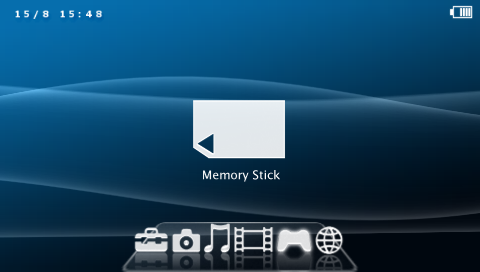
Poisonhzkj has rolled out an update to CXMB, a custom firmware plugin that allows users to load custom made XMB themes from the memory stick.

The update features compatibility with custom firmware 3.71 M33, however the author notes that you must use a 3.71 compatible theme.

Download CXMB v2.5

Custom XMB Plugin v2.5 (9/28) Update [2Alien]
 
X3, do you know if I'd be able to have custom sounds for 3.71 M33 if I used this version of CXMB?
 
X3, do you know if I'd be able to have custom sounds for 3.71 M33 if I used this version of CXMB?

Yeah... but I haven't seen anyone create themes for 3.71 M33 yet, aside from the official PTF themes.
 
well, what about that official theme creator? that could be used for the XMB icons, couldn't it? I'm just exploring options before I go back up to 3.71
 
well, what about that official theme creator? that could be used for the XMB icons, couldn't it? I'm just exploring options before I go back up to 3.71

Yep, the official theme creator works for XMB icons.
 
hi there,

i was just wondering where to find some themes that works with cxmb. sorry for such a n00bs question.
 
just wondering but does CXMB let you change the LAYOUT of the XMB and not just the icons?....thats what i found so disappointing about the official custom themes is that they just replace the icons....
 
just wondering but does CXMB let you change the LAYOUT of the XMB and not just the icons?....thats what i found so disappointing about the official custom themes is that they just replace the icons....

i guess.
there are module/nodule/resource folder, so basically all the files changing layouts will be thrown in the nodule folder (ms0:/seplugins/VSH/nodule)
enable the plugin and BAM! you've got yourself a nice custom theme!


EDIT: see the picture that x3 put on top? it has a changed layout eh? I believe x3 won't just put any picture on there. I'm pretty sure then that you can change the layouts as well. :D
 
EDIT: see the picture that x3 put on top? it has a changed layout eh? I believe x3 won't just put any picture on there. I'm pretty sure then that you can change the layouts as well. :D

i know that but i wasnt sure...you see,on the official themes,there are some preview's that show the same kinda thing but theyre just icon replacements...thats why i was asking...and if this works with 3.71M33 then i'll try it out but would have to wait til later since i'm in college at the moment.
 
CXMB works with 3.71 M33, but I haven't seen many 3.71-compatible themes around... everyone seems to be using the PTFs now.
 
CXMB works with 3.71 M33, but I haven't seen many 3.71-compatible themes around... everyone seems to be using the PTFs now.

ah,alright...problem though is that the ptf's dont have a custom LAYOUT...they have custom icons but not a layout which is what i'd want....bleh....does XCMB do that?
 
ah,alright...problem though is that the ptf's dont have a custom LAYOUT...they have custom icons but not a layout which is what i'd want....bleh....does XCMB do that?

yeah it completely changes the look
 
How do you convert back to the offical sony XMB, if you want to update cfw's again, because i heard to update firmwares you must remove the custom ones....
 
How do you convert back to the offical sony XMB, if you want to update cfw's again, because i heard to update firmwares you must remove the custom ones....

No need, installing a new CFW completely wipes the flash and installs new files. So after updating your custom theme will be gone anyway.
 
why doesn't some of the cxmb Themes not work (not the ptf ones) the ones using RCO, i d/l'ed a few that is udpated and coverted for 3.71M33-2 and the alignment and everything is not even proper :-|
 
Back
Top