
eXophase


Reply
 
Thread Tools
  #1  
Old 02-17-2008, 03:11 AM
Acerthief's Avatar
Acerthief Acerthief is offline
Lead Moderator
 
Join Date: Mar 2007
Location: Taipei, Taiwan
Posts: 2,252
Acerthief is a jewel in the roughAcerthief is a jewel in the roughAcerthief is a jewel in the rough
Send a message via MSN to Acerthief
Installing the Time Machine (with DCv8)

Time Machine, is an application to load previous firmware from the memory stick with a Pandora Battery. Now with the latest version v0.1, you can load 1.5, 3.40OE, and 3.60M33, etc, onto your PSP. The entire installation takes up around 210~220MB of space, so 128MB sticks are not enough.


Requirements

*A Memory Stick Pro Duo with at least 256MB of capacity (512MB/1GB Recommended)
*A homebrew compatible PSP with at least 2.71SE (M33 Series Recommended)
*A Pandora Battery

Installation: Universal Unbricker/Pandora Battery

**This step is optional. However, we still highly recommend you to do so.**
1. Follow the guide HERE and install the Universal Unbricker.

--Users Notice: Don't want the latest Universal Unbricker? Just install any Universal Unbricker that you want, then proceed with the guide.


Installation: Time Machine


1. Download the timemachine_0.1.rar.

2. Open the archive, and copy the "TIMEMACHINE" folder into "X:/PSP/GAME".

3. You're 150.PBP or 340.PBP should still be in the root of the memory stick after the DCv5 installation.
-If not, download the 150.PBP, 340.PBP, and put them in the root of the memory stick (i.e. X:/150.PBP, X:/340.PBP)

4. Put the 360.PSAR in the root of the memory stick (X:/360.PSAR)
(1) No 3.60 eboot are on the net as the slim was shipped directly with 3.60, so you'll have to google it, or dump it if you have 3.60M33(Directions below).
(2) You can skip this step, and step [11] [12] if you only want 1.5 and 3.40OE.

5. This is what you should see in the XMB. Execute the program.
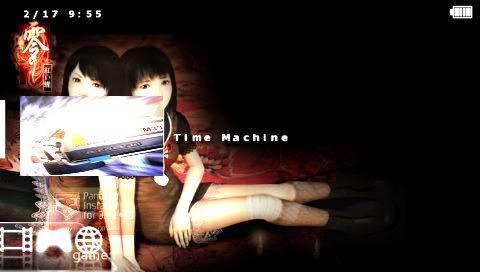

6. After you are in you should see this:
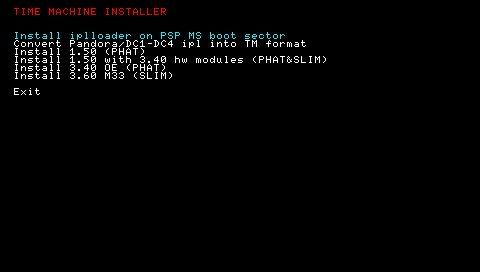

7. Choose "Install iplloader on PSP MS boot sector". After it's done press the X button to return to the menu.

8. Now Select "Convert Pandora/DC1-DC4 ipl into TM format". Again, press X to return.
**If you don't have DCv5 installed, you may skip this step.

9. Press "Install 1.50" to install 1.5 onto the memory stick. Press X to return.

10. Press "Install 3.40OE" to install 3.40OE onto the memory stick. Press X to return.

*11. Press "Install 1.50 with 3.40 hw modules" if you have 360.PSAR in the root. Press X to Return.

*12. Press "Install 3.60M33" if you have 360.PSAR in the root. Press X to Return.
[*] Again, you must have a copy of 360.PSAR in the root in order to use step 11 and 12. Otherwise, you may skip it.

13. There you have it. DCv5 with Time Machine! See the usage below.


Dumping: 360.PSAR


**You must have a PSP with 3.60M33. Otherwise don't use this part of the guide or look for the file on the web.

1. Open the timemachine_0.1.rar archive, and copy the "360DUMPER" folder to "X:/PSP/GAME".

2. Execute the program, and follow the instructions.

3. There you have it! 360.PSAR ready to be used.


Usage: Time Machine


Like DC, stick in the memory stick, then put the pandora battery in.
But before you insert the battery, hold button relative to the firmware you want:


Default Buttons:
- 1.50: cross (Phat)
- 1.50+3.40hw: circle. (Phat/Slim)
- 3.40 OE: triangle. (Phat)
- 3.60 M33: square (Slim)
- Pandora/DC1-4 ipl (converted to TM format): digital up
- Anything else: will boot the firmware installed on flash.


Note:
(1) Do NOT attempt to run DevHook on TimeMachine. There is a known bug that can cause corruption to ID Storage, meaning you won't be able to restore your PSP without an ID Storage or NAND backup.

(2) If you happen to have TM installed and have updated your Universal Unbricker / Despertar del Cementerio, you will have to Convert Pandora ipl into TM format [Step 8] again.

__________________
Someone should hire a Hooter for Chilly Willy.
::Release::
::Guides::

Last edited by Acerthief; 04-06-2009 at 05:09 PM..
Reply With Quote
  #2  
Old 02-17-2008, 10:33 PM
sasan50cent sasan50cent is offline
Junior Member
 
Join Date: Feb 2008
Posts: 1
sasan50cent is on a distinguished road
Thanks , Great tutorial .
Reply With Quote
Alt
Sponsor
 
  #3  
Old 02-22-2008, 12:07 AM
z7shaft z7shaft is offline
Junior Member
 
Join Date: Feb 2008
Posts: 5
z7shaft is on a distinguished road
Hi, I'm z7shaft
Just 5 minutes ago I decided to finally convert my 1gb Memory Stick and my PSP-1001 battery into pandora, then despertar del cementerio v3, then TIMEMACHINE, and I'm enjoying it!

I have successfully installed 1.50 Firmware, 1.50 with 3.40 Hardware Modules,
and 3.60 from PSAR.
But I get this weird problem when installing 3.40 OE.
Everything goes fine, then it freezes at visualizer_plugin.rco, and nothing else happens, after a while the psp shuts off itself...

So, anyone knows why this happens?
I have like 800 mb free in the MS, also everything was properly done since Despertar del cementerio v3 loads fine with DigitalUp, 1.50 loads fine with X, 1.50fw3.40hw loads fine with O, but 3.40 wont install...
Reply With Quote
  #4  
Old 02-22-2008, 10:55 AM
Acerthief's Avatar
Acerthief Acerthief is offline
Lead Moderator
 
Join Date: Mar 2007
Location: Taipei, Taiwan
Posts: 2,252
Acerthief is a jewel in the roughAcerthief is a jewel in the roughAcerthief is a jewel in the rough
Send a message via MSN to Acerthief
Quote:
Originally Posted by z7shaft View Post
Hi, I'm z7shaft
Just 5 minutes ago I decided to finally convert my 1gb Memory Stick and my PSP-1001 battery into pandora, then despertar del cementerio v3, then TIMEMACHINE, and I'm enjoying it!

I have successfully installed 1.50 Firmware, 1.50 with 3.40 Hardware Modules,
and 3.60 from PSAR.
But I get this weird problem when installing 3.40 OE.
Everything goes fine, then it freezes at visualizer_plugin.rco, and nothing else happens, after a while the psp shuts off itself...

So, anyone knows why this happens?
I have like 800 mb free in the MS, also everything was properly done since Despertar del cementerio v3 loads fine with DigitalUp, 1.50 loads fine with X, 1.50fw3.40hw loads fine with O, but 3.40 wont install...

What firmware do you have on your PSP currently?
and What brand of memory stick are you using? The size of the memory stick?

Also, I'd recommend you to use DCv4, as it is the latest version of the pandora series, it's more stable.
__________________
Someone should hire a Hooter for Chilly Willy.
::Release::
::Guides::
Reply With Quote
  #5  
Old 03-31-2008, 02:54 PM
Coy Coy is offline
Junior Member
 
Join Date: Jan 2008
Posts: 5
Coy is on a distinguished road
nice guide. will this work with the new DCv5?
thanks.

edit

it will work. but somewhat how in the new dcv5
Reply With Quote
  #6  
Old 04-01-2008, 07:26 AM
Acerthief's Avatar
Acerthief Acerthief is offline
Lead Moderator
 
Join Date: Mar 2007
Location: Taipei, Taiwan
Posts: 2,252
Acerthief is a jewel in the roughAcerthief is a jewel in the roughAcerthief is a jewel in the rough
Send a message via MSN to Acerthief
"but somewhat how in the new dcv5"
Dont getcha boy.
__________________
Someone should hire a Hooter for Chilly Willy.
::Release::
::Guides::
Reply With Quote
  #7  
Old 04-01-2008, 12:11 PM
Coy Coy is offline
Junior Member
 
Join Date: Jan 2008
Posts: 5
Coy is on a distinguished road
^ Sorry mate, just forget it I am sleepy at that time. I’ve already managed to install time machine in DCv5.
Reply With Quote
  #8  
Old 04-05-2008, 07:22 PM
phrix626 phrix626 is offline
Junior Member
 
Join Date: Mar 2008
Posts: 1
phrix626 is on a distinguished road
Quote:
Originally Posted by z7shaft View Post

But I get this weird problem when installing 3.40 OE.
Everything goes fine, then it freezes at visualizer_plugin.rco, and nothing else happens, after a while the psp shuts off itself...

So, anyone knows why this happens?
You need to go into Recovery mode and set your homebrew folder kernel to 3.xx

I had the same problem. for some reason 3.40 OE install doesn't work with 1.5 kernel
Reply With Quote
  #9  
Old 04-19-2008, 10:24 PM
chrizzyj chrizzyj is offline
ultra member
 
Join Date: Apr 2008
Location: UK
Posts: 4
chrizzyj is on a distinguished road
Send a message via MSN to chrizzyj Send a message via Skype™ to chrizzyj
Brilliant guide thanks allot.
Reply With Quote
  #10  
Old 05-20-2008, 10:38 PM
ichigo246 ichigo246 is offline
Junior Member
 
Join Date: May 2008
Posts: 0
ichigo246 is on a distinguished road
?

Will this time machine work for 3.90 m33-3
Reply With Quote
 Reply

  • Submit Thread to Digg Digg
  • Submit Thread to del.icio.us del.icio.us
  • Submit Thread to StumbleUpon StumbleUpon
  • Submit Thread to Google Google
  • Bookmarks


    Tags
    alex, battery, cementerio, dark, dark-alex, dcv5, del, despertar, guide, hack, install, installation, installing, magic, memory, pandora, psp, stick, time machine, tm, v5

    Thread Tools

     
    Similar Threads
    Thread Author Forum Replies Last Post
    Help with PSP Slim: Buying, Downgrading and Time Machine Alucard77 PSP Help Center 10 10-23-2008 06:50 AM
    >>> REQUEST for NEW Time Machine <<< vp10120 PSP General 1 06-29-2008 09:57 AM
    DC4 and DC5 with time machine 0.1 phrix626 PSP Help Center 0 04-01-2008 03:12 PM
    BIG beug with time machine arckosfr PSP Help Center 4 02-17-2008 08:16 PM
    Clip: Dark_AleX's Time Machine - 1.5 Kernel For Slim x3sphere PSP News 12 02-02-2008 07:47 AM

    Forum Jump


    no new posts