• Steam recently changed the default privacy settings for all users. This may impact tracking. Ensure your profile has the correct settings by following the guide on our forums.
  • If your profile is showing up as Not Ranked, please review our rules page and follow the appeal process detailed there.

Game Disappears After Changing Timestamp

Hello,

I'm experiencing a problem when trying to organize my games by manually editing the dates and times.

Sometimes I adjust the timestamps to keep games from the same franchise grouped together in the correct order. Recently, I tried doing this with my four versions of Resident Evil 4 (2005). The last one I edited was the PS4 version.

The issue is that after I change the date and time, the game disappears from my list. It is not visible anymore in the normal game list, and I can only find it by searching for the title using the search function.

This seems to happen specifically with Resident Evil 4 (2005), while I have been able to organize other games without problems.

Could you please let me know what might be causing this issue and if there is a way to fix it?

Thank you for your help.
 
What did you change the last played date to or was it reverted since? I still see all instances of RE4 2005 on your profile even without using a search.

Are you sure you didn't accidentally click the Hide Game checkbox when doing it?
 
What did you change the last played date to or was it reverted since? I still see all instances of RE4 2005 on your profile even without using a search.

Are you sure you didn't accidentally click the Hide Game checkbox when doing it?
Hello,

Yes, you are currently able to see all of my Resident Evil 4 entries because I removed the custom date and restored the original timestamp after noticing the issue.

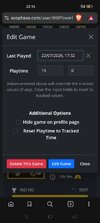
To demonstrate the problem again, I have just edited the date of the PlayStation 3 version of Resident Evil 4 (2005).

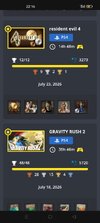
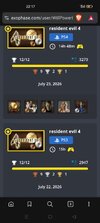
The date I set is July 22. Based on the order of my games, it should appear between the PS4 version of Resident Evil 4 and Gravity Rush 2 (which was last played on July 18). However, the PS3 version does not appear there at all.

The game is not hidden. If I go to the search tab and search for "Resident Evil 4", the PS3 version appears correctly with the July 22 date that I assigned. The problem is that it does not show up in the normal game list where it should be displayed according to the timestamp.

If I remove the custom date and restore the original one, the game immediately appears in the normal list again.

So the issue only occurs after I edit the date/time of that game. It remains searchable, but it disappears from the main game list.
 

Attachments

  • Screenshot_2026-08-03-22-16-57-83_e4424258c8b8649f6e67d283a50a2cbc.jpg
    Screenshot_2026-08-03-22-16-57-83_e4424258c8b8649f6e67d283a50a2cbc.jpg
    174.9 KB · Views: 0
  • Screenshot_2026-08-03-22-16-17-47_e4424258c8b8649f6e67d283a50a2cbc.jpg
    Screenshot_2026-08-03-22-16-17-47_e4424258c8b8649f6e67d283a50a2cbc.jpg
    164.5 KB · Views: 0
  • Screenshot_2026-08-03-22-17-26-95_e4424258c8b8649f6e67d283a50a2cbc.jpg
    Screenshot_2026-08-03-22-17-26-95_e4424258c8b8649f6e67d283a50a2cbc.jpg
    170.6 KB · Views: 0
Ok, I see the issue. Should be fixed now.

Edit: Actually, this broke something for those that don't have an Exophase account associated with their profile page. Rolled back the fix for now until I can come up with a solution.
 
Last edited:
Ok, I see the issue. Should be fixed now.

Edit: Actually, this broke something for those that don't have an Exophase account associated with their profile page. Rolled back the fix for now until I can come up with a soluti
No problem, I understand. I'll wait for a new fix when you have a solution that works without affecting other users.

In the meantime, I'll leave the edited date on the PlayStation 3 version of Resident Evil 4 so the issue remains visible on my profile if you need to compare it or use it for testing.

Thanks again for your help and for taking the time to investigate this.
 
Back
Top